

#Short Answer
Explains What Is Jupyter Notebook, including the core definition, how it works, practical examples, and limitations.
#Infobox
#Overview
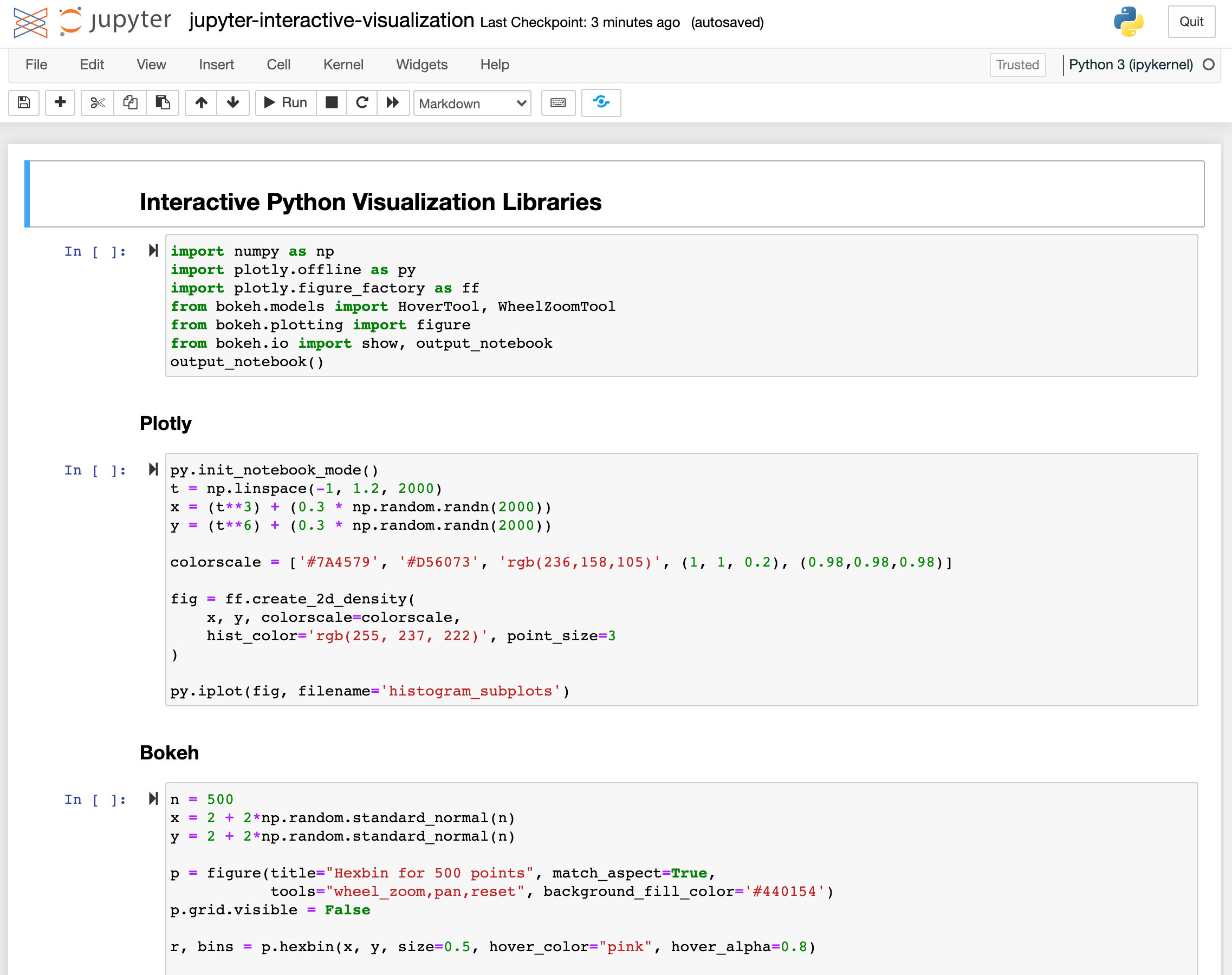
Jupyter Notebook is a versatile tool designed for interactive computing, enabling users to combine executable code, rich text, visualizations, and multimedia in a single document. Originally derived from the IPython project, it evolved into a standalone platform under the Project Jupyter umbrella. The name "Jupyter" is a homage to the three core programming languages it supports: Julia, Python, and R. Notebooks are structured as cells, which can contain code, text (formatted in Markdown), equations (via LaTeX), images, or interactive widgets. This modular approach makes it ideal for data exploration, prototyping, and educational purposes. Users can execute code in real-time, visualize results immediately, and document their workflows seamlessly.
#History / Background
#Origins in IPython The roots of Jupyter Notebook trace back to IPython, an interactive shell for Python created by Fernando Pérez in 2001. IPython introduced features like tab completion, interactive debugging, and rich output display, which laid the foundation for notebook-style computing. In 2011, Pérez and Brian Granger developed the IPython Notebook, a web-based interface that allowed users to create documents with executable code and text.
#The Birth of Project Jupyter In 2014, the IPython team announced the Project Jupyter, expanding the notebook concept beyond Python to support R, Julia, and other languages. The name "Jupyter" was chosen to reflect this multi-language support. The project also introduced JupyterLab, an advanced interface for working with notebooks, and JupyterHub, a platform for multi-user notebook servers.
#Evolution and Adoption Jupyter Notebook gained widespread adoption in academia, industry, and data science due to its flexibility and ease of use. Major platforms like Google Colab, Kaggle, and AWS SageMaker integrated Jupyter Notebooks, further popularizing the tool. The Jupyter ecosystem now includes extensions, kernels for additional languages, and integrations with cloud services.
#How It Works
#Architecture Jupyter Notebook operates on a client-server model:
- Frontend: A web browser interface where users interact with notebooks.
- Backend: A kernel that executes code in a specific programming language.
- Notebook Document: A JSON-based file (
.ipynb) storing code, text, and metadata.
#Key Components
- Kernels: Separate processes that run code in different languages (e.g., Python 3, R, Julia). Each kernel maintains its own state.
- Cells: The fundamental units of a notebook. Cells can be:
- Code cells: Contain executable code.
- Markdown cells: Support formatted text, equations (LaTeX), and images.
- Raw cells: Unprocessed text (e.g., for custom formatting).
- Notebook Server: Manages user sessions, kernels, and file access.
#Workflow
- Create a Notebook: Users launch a notebook server and open a new
.ipynbfile. - Write Code: Code is entered into cells and executed via the kernel.
- Visualize Results: Outputs (plots, tables, etc.) are displayed inline.
- Document: Markdown cells are used to add explanations, headings, and equations.
- Save and Share: Notebooks can be exported to formats like HTML, PDF, or slides.
#Supported Languages Jupyter supports 50+ languages through kernels, including: - Python (default) - R - Julia - Scala - JavaScript - C++ (via extensions)
#Important Facts
- Interactive Computing: Unlike traditional scripts, Jupyter allows step-by-step execution and real-time feedback.
- Reproducibility: Notebooks can be shared with embedded outputs, ensuring transparency in research and analysis.
- Collaboration: Tools like nbviewer and JupyterHub enable collaborative editing and cloud-based notebooks.
- Educational Tool: Widely used in data science courses, bootcamps, and MOOCs (e.g., Coursera, edX).
- Security: Notebooks can execute arbitrary code, so they should be used with caution in shared environments.
- Performance: Large notebooks with heavy computations may slow down due to kernel memory usage.
#Timeline
- Foundational ideas
Core concepts and early methods shape What Is Jupyter Notebook?.
- Practical use
Tools, examples, and real-world deployments make the topic easier to evaluate.
- Responsible implementation
Current work focuses on reliability, governance, performance, and measurable impact.
#Related Terms
#FAQ
What does What Is Jupyter Notebook? cover?
Explains What Is Jupyter Notebook, including the core definition, how it works, practical examples, and limitations.
Why is What Is Jupyter Notebook? important?
It helps readers understand key concepts, compare practical use cases, and evaluate how AI Tools decisions affect outcomes, risks, and implementation choices.
What should readers verify before applying this topic?
Readers should compare benefits, limitations, data requirements, and related themes such as Jupyter, Notebook, AI before using the ideas in real projects.
#References
- What Is Jupyter Notebook? terminology and background research
- What Is Jupyter Notebook? use cases, implementation examples, and limitations
- AI Tools best practices, standards, and risk guidance
- Jupyter case studies, benchmarks, and current industry analysis


Comments
No comments yet. Start the discussion with a useful note.